Securing your network: A System Administrators guide

Your network is constantly under attack. It doesn’t matter what you are hosting, or how objectively valuable or valueless your data may be, someone, somewhere is trying to break in to give you a bad time.
Our normal approach to securing and monitoring an environment is below, an approach pulled from documented best practice and combined decades of industry experience.
Documentation
The first step to securing any environment must be a comprehensive set of documented policies and procedures. These documents will be aimed at both IT system-administrators and other IT team members, as well as separate set governing network use by the end users.
The risks of RMM
As an MSP, it is common practice to implement remote monitoring and management (RMM) tools provided by third parties, however this model requires significant mutual trust with the vendor, and recent cyber security events have reinforced how risky this can be.
Secure the network boundary

Securing the network boundary is a good first step. Using an enterprise grade firewall such as PFSense as the edge device, I first minimise the exposure of devices to the internet by creating a DMZ VLAN which will house a proxy server and load balancer. (often NGINX or HAProxy) This may exist on the pfsense itself when suitably resourced with appropriate redundancy.. The Proxy server will usually also do https offloading and will be open to the internet on 443 and 8- (with a 301 redirect, http is only open for certificate renewal).
A suitable SMTP Proxy may also be implemented depending on how mail is being relayed and considerations for protocols such as SIP may need to be considered and risks mitigated separately depending on environment use cases.
Implement Windows Helo of 2nd factor authentication wherever possible. The Proxy server may also run Authelia or similar radius service to provide 2FA functionality to applications that do not support it natively.
The Pfsense device will run Snort or Suricata, software tools that inspect all network traffic threats, intrusions and patterns indicating exploits. These tools learn to identify “normal” network traffic and will alert when risks are first identified.
Any other servers that need to have services available on the internet are located within their own VLAN and have restricted communication with the proxy on specific ports only.
Monitor and report
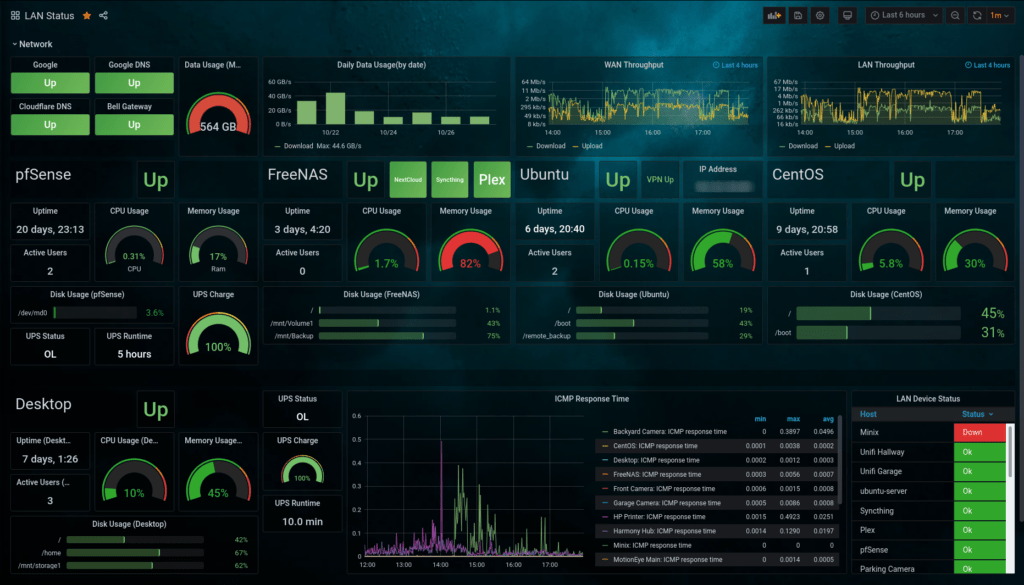
Tools such as Zabbix can be customised and deployed to monitor any metric in real time, from node availability, through to configuration changes, logins or password resets. This data can be fed into Grafana for real time visual representation of data.
Active Directory Hardening
- AD Auditing should be enabled with log monitoring configured using third party tools
- No shared administrative accounts
- Removal of users from Domain Admins group, and delegation of permissions to add users to DA group only when administrative tasks need to be performed.
- DIsable the local administrator account on all devices. This can be implemented via group policy.
- Best practice suggest the use of LAPS or other centrally managed tool for one time passwords such as BeyondTrust Least Privilege
- A jump server should be configured that has the required access to servers and other system objects. This is the only system in which administrative tasks should be performed from. This system should have no access to email or internet to minimise the risk of compromise.
- Ensure all permissions are limited by group membership, not on individual accounts.
- Ensure domain controllers are not dual role
- All domain controllers and other server devices must be as up to date as possible.
- If integrated with Azure Active Directory, enable Azure Privileged Identity Management (PAM) module to monitor access to privileged accounts, services and data.
Active directory hardening is a complex, yet imperative project and consists of the following primary tasks:
End-user device protection
A documented “standard operating environment” should exist and software deployment should be automated to users depending on group membership.
All end user devices should be as locked down as possible via group policy. In the event where the device may not regularly reconnect to the network, a third party services such as DeepFreeze should be used, to make the device configuration immutable even if not receiving updates and vulnerable to exploits.
The PFSense or other gateway device should be running as a DNS server, resolving local domain requests back to the authorised WIndows or Linux Domain controllers. The PFSense should be configured with access to upstream DNS blocklists, providing up to the minute information on known bad web addresses, and blocking them at a DNS level for all devices on the network in real time – a solution that also doesn’t put any additional overhead on the end-user devices.
Centralise updates and patch management and include reporting. Updates and patch management should be subject to a change management procedure.
All administrative changes must go through a change management procedure, including a change request and change action board.
A suitable malware protection tool should be deployed to all devices, in most cases the best case tool is Microsoft Defender which is baked into all modern Windows operating systems. If budgeted, Integrate with Azure Advanced Threat Protection.
Additional key notes
All systems should have their logs collated into a Security Information and Event Management (SIEM) tool like Greylog.
Network services should be isolated by virtual machines, containers and VLANs, with specific rules governing traffic flow between VLANS.
Physically secure network devices and disable unused ports.
Certificate based authentication should be implemented for wireless access to business networks.
Isolate everything. Run services on separate virtual machines or in separate containers whenever possible.
Remote access should be limited to VPN or 2FA protected HTTPs web portal
Backups should be configured in accordance with best practice, and air gapped where possible.
Any and all administrative changes must be documented with an audit trail.
Continuously educate IT and non-IT staff about cybersecurity threats and mitigations.
Maintain and enforce scheduled manual checks of backups including test restores.
Schedule manual audits of configurations, especially edge devices and active directory group membership.
Recent Comments